Stop copying trades by hand. The copier reads the signals in your favourite Telegram channels and places them in your MetaTrader 5 account, usually within seconds, sized by your own risk rules, then manages every trade to the close. Day and night, for as long as your PC runs it.
Get launch news Read the user guide (PDF)
Launching soon. Subscribers to the free AURUM newsletter hear first.
A signal arrives while you are at work, asleep or away from the screen. By the time you type it into MetaTrader the price has moved, a digit goes wrong in the stop-loss, and the position size is a guess. The take-profits need watching, the stop-loss needs moving, and the next signal is already in.
The copier takes over the typing and the watching. It reads each new signal as it is posted, applies the same risk rules every time, and tells you exactly what it did. You decide which channels to follow and how much to risk; it does the execution.
A message arrives in a channel you switched on.
Symbol, direction, entry, TPs and stop-loss are read. Old, repeated or incomplete messages are skipped.
Market or limit order, sized from your risk setting and split across the take-profits.
Partial closes at each TP, stop-loss to entry, expiry of unfilled limits, and a report of each step.
Illustrations of how messages are handled, shown as message formats without price levels. They are not trade signals, recommendations or records of actual trades.
Symbol, buy or sell, entry or entry zone, several take-profits, stop-loss, market, limit or stop orders, "TP: open", provider names such as GOLD for XAUUSD, and signals completed by a later edit.
Size every signal from the risk you choose (the % of equity at risk between entry and stop-loss; slippage, gaps and costs can make a loss larger), a money amount per pip, or fixed lots, with a cap per signal.
Share each position over the TPs (for example 80, 10, 10), as one position with partial closes or one position per TP.
Move the stop-loss to entry after TP1, or step it up behind each TP, and trail a runner on "TP: open" signals with an ATR stop.
Market order only when price is still close to the entry, otherwise a limit order or no trade, with expiry times for limits that do not fill.
Dry run, a floating-loss stop for all copier trades, a daily profit target that closes the copier's trades (optional) and pauses until the next Asia open, one channel at a time, no new trades on Fridays if you wish.
Re-posted or forwarded copies of a signal in the same channel, messages that arrive late after a reconnect, chat that is not a signal, and symbols you blocked.
Up to five channels, one tab each: its own size, split, entry and stop-loss rules, symbols and entry, SL and TP offsets.
Each plan, fill, partial close, stop-loss move and skip is sent to your Telegram Saved Messages, with the reason (individual trailing-stop steps go to the log file).
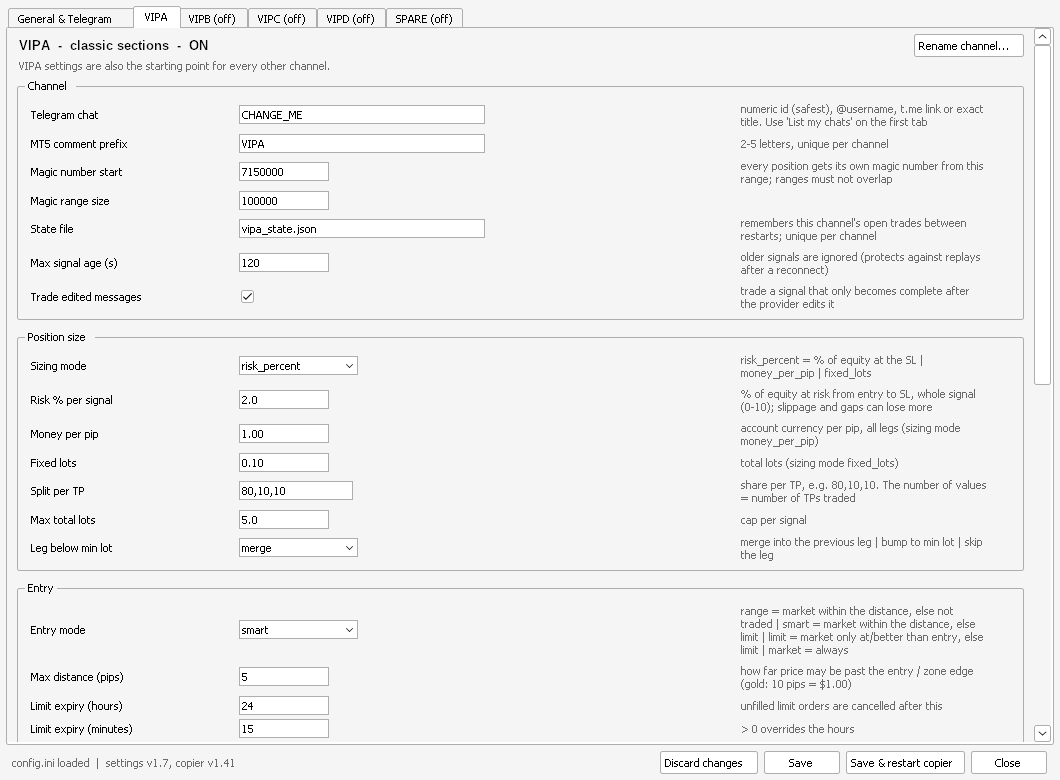
The settings window: a General tab, then one tab per channel. Every setting is explained beside it.
No. The copier follows Telegram channels and groups that you join and choose. AURUM does not provide, select, review or endorse signal providers, and does not publish trade signals.
Channels and groups you are a member of whose messages state the trade in text: symbol, buy or sell, stop-loss and take-profits, with or without an entry price. Up to five channels can be set up. Signals posted only as images are not read. Use Dry run first to see how it reads your channel.
MetaTrader 5 with a hedging account, at a broker that allows automated (Algo) trading. Check your broker's or prop firm's rules on automated and copy trading before use. Broker symbol suffixes and names are set once in the settings. MetaTrader 4 is not supported.
Yes. Signals are copied, and open trades are managed (partial closes, stop-loss moves, the floating-loss stop and the daily target), only while the copier runs on your PC or a Windows VPS. While it is off, open trades keep only the stop-loss and take-profit already set at the broker, and new messages are not traded afterwards, because they would be late.
No. The copier runs on your PC with your own MetaTrader 5 and Telegram logins, which stay on your PC. The copier program only sends our licence server your purchase key, the program version and a coded PC id: once to register your copy, then about once a week to confirm it is still active. It never sends us your trades, account details or messages. What we keep about a purchase is set out in the privacy notice.
No. Messages such as "close now", "move SL to entry" or a change to a signal that has already been traded are not acted on; the copier manages each trade by your own settings. One exception: a new signal in the opposite direction cancels unfilled orders and, by default, closes earlier trades that have reached TP1. Check open trades yourself when a channel posts updates.
Your copy registers itself to the first PC it starts on and runs there. Moving to a new PC, a rebuilt VPS or reinstalling Windows: contact us and we move it.
The copier places and manages the trades of the signals you choose, with your rules. Results depend on those signals, your settings and the market. It does not make trading safe or profitable, and losses can exceed your deposit.
Important. AURUM Intelligence provides software and education only. The copier places the signals you choose to follow, with the settings you choose; you remain responsible for every trade in your account. Nothing on this page is investment advice, a recommendation or an endorsement of any signal provider. AURUM Intelligence is not authorised or regulated by the Financial Conduct Authority (FCA).
Risk warning. Trading gold and leveraged products such as CFDs and spot FX carries a high risk of loss and can result in losses exceeding your deposit. Signal providers can be wrong, late or change their messages; connections, brokers and software can fail. Past performance is not indicative of future results. Test with Dry run and a demo account first. Full disclaimer.
Join the free AURUM Intelligence newsletter: the daily gold research note by email, and the copier launch news with it.